Card Binding Precautions
👉 For prepaid cards, you can bind the card immediately after opening it. Please ensure there is sufficient balance before use.
👉 For stored-value cards, please recharge $10 to activate the card before binding it, so that the binding can succeed. A binding fee of 0.3 will be deducted during the process, which is normal.
If the card has no balance, it is not activated and cannot be used for any other operations.
Common Reasons for Card Binding Failure
The merchant indicates that the card has been bound too many times
Do not repeatedly attempt to bind the card after a failed attempt. Too many failures can trigger risk control restrictions. You need to contact the corresponding card binding platform to refresh before trying again or wait for the risk control to be lifted.
We were unable to verify your payment method
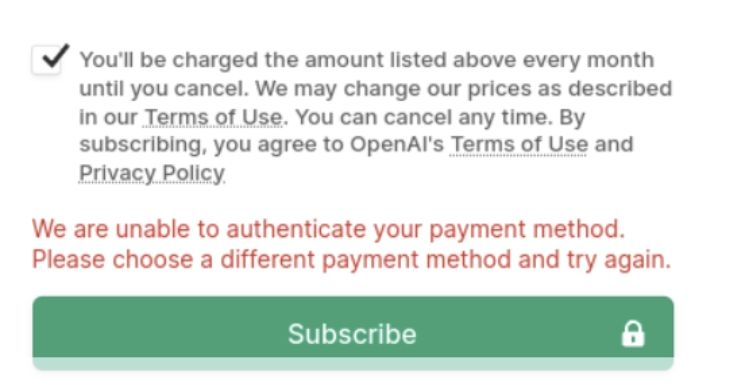
When subscribing to ChatGPT Plus, you might sometimes see the following error:
We are unable to authenticate your payment method.
We were unable to verify your payment method.
The "unable to authenticate" error usually occurs because too many people are using our current proxy IP, which causes the IP to be flagged by Stripe for risk control and results in payment being rejected.
I have summarized the contact information for all platforms.
Calude platform customer service contact information
Online Chat: Visit the Anthropic official support page, click the bubble in the bottom right corner, and select "send a new message" to chat with Claude's support bot. If the issue is more complex, the bot will transfer the conversation to a human support agent.
Email: For general technical support or routine inquiries, you can send an email to
[email protected]. For sales inquiries, email[email protected]; for privacy-related requests, contact[email protected]; to report security vulnerabilities, send an email to[email protected]; for reporting user safety issues or providing suggestions, email[email protected].In-App Support: Paid users of Claude Pro, Team, Enterprise, or the API console can log in to their Claude.ai account, click their avatar or name in the bottom left, select "get help," and chat with the AI support bot Fin in the support messenger. If further assistance from the product support team is needed, you can choose "wait for the team." Free users can also get help this way.
ChatGPT Platform Customer Service Contact Information
Live Chat: Visit the OpenAI Help Center. If you are logged into your account, click the "Help" button to start a conversation; if you are not logged in or do not have an account, select the chat bubble icon in the bottom right corner to initiate contact.
Email: For general inquiries, you can email [email protected]. For support-related issues, email [email protected].
App Store Customer Service Contact Information
Phone Contact:
Mainland China: Customer service hotline is 400-666-8800.
Hong Kong: Customer service number is (852) 2112-9966.
Taiwan: Customer service number is 0800-022-237.
Online Contact: You can visit the Apple Support website, select the relevant product or service issue, and communicate with customer service via online chat.
Email Contact: For App developer-related issues, you can send your questions to [email protected].
Methods to Link Bank Cards on Various Platforms
How to link ChatGPT
https://static.dogpay.com/static/videos/%E8%AE%A2%E9%98%85chatgpt.mp4
How to subscribe to Twitter
Log in to https://x.com/
Subscription and Payment
After logging into your Twitter/X account, click on 'Premium' in the left menu bar.
Choose Basic, Premium, or Premium+ according to your needs, and click Subscribe & Pay.