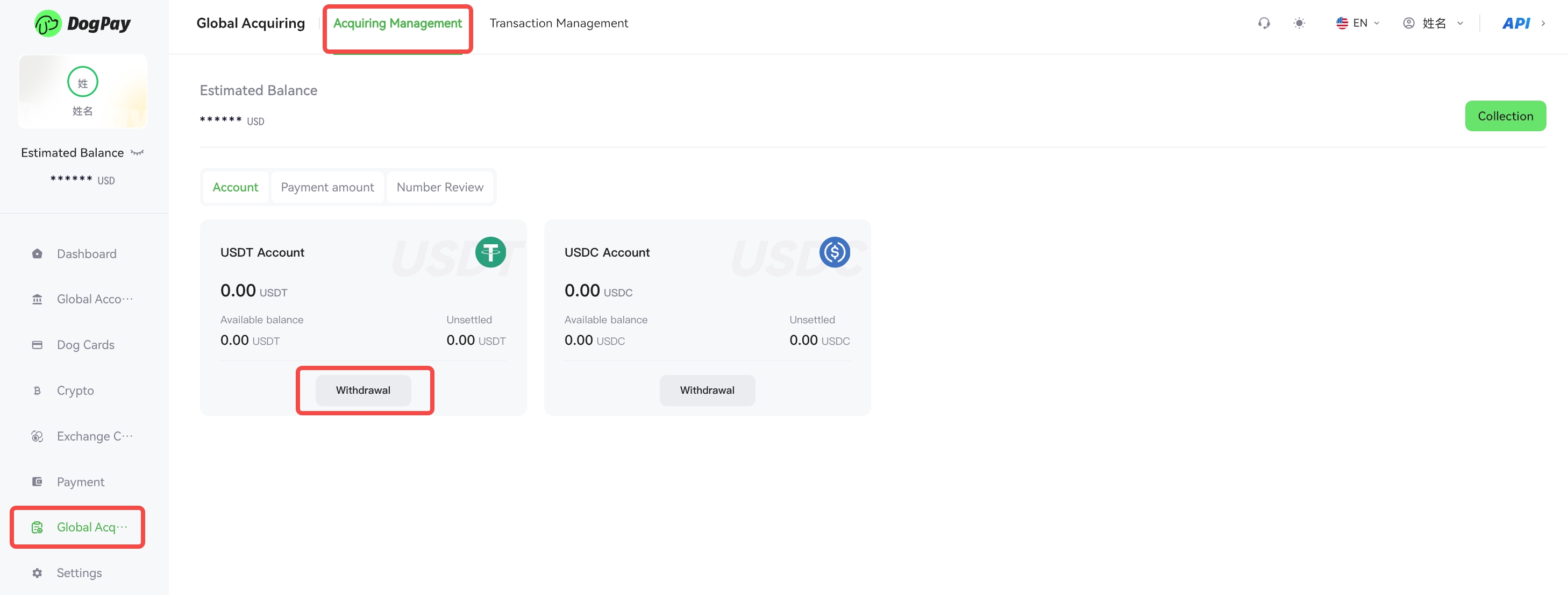
You can withdraw your payment settlement funds to your bank account via the DogPay Merchant Portal, enabling efficient and flexible fund management.
Example Steps:
• Log in to your account and go to Global Acquiring → Acquiring Management.
• Click the Withdrawal button, select the received wallet, enter the withdrawal quantity, and click Withdraw Now. After withdrawal, you can view your assets under Crypto → Wallet List.
• Go to the Exchange Center.Select the cryptocurrency wallet to sell from and the bank account to buy into, enter the amount, then click Confirm Exchange.
• To make a payment to an external bank account, go to Global Account → My Accounts, click Payment, select the payment and payee's account, enter the payment amount, and upload the supporting proof documents for verification. Once approved, the payment will be completed.
💡 Note:
Please ensure the recipient’s bank account information is accurate to avoid payment failure.